Elevate Your Web Design with Alliterate Font
As a web designer, I'm always on the lookout for fonts that can add a touch of elegance and personality to my projects. Recently, I came across Alliterate, a premium font that has quickly become a favorite in my design toolkit. This handwritten font is not just visually appealing; it's also incredibly versatile and functional for a wide range of digital design needs.
The Visual Charm of Alliterate
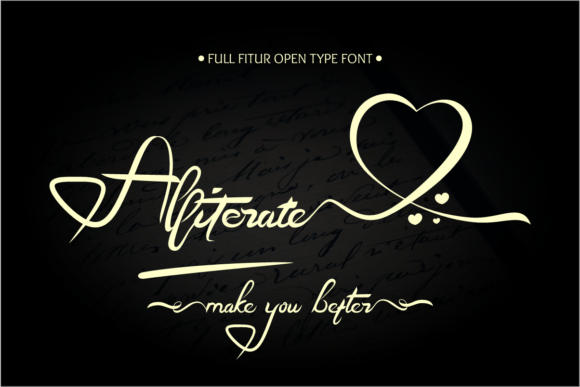
Alliterate is an elegant and flowing handwritten font with a varying baseline and smooth lines. Its gorgeous glyphs and swashes give it a unique, almost calligraphic feel. The PUA encoding means you can easily access all the glyphs and swashes, making it a joy to use in both simple and complex designs. The font's personality is both modern and timeless, perfect for adding a personal touch to any web project.
Testing Alliterate in Real Web Layouts
I recently had the opportunity to test Alliterate in a real-world scenario: a boutique online store. The goal was to create a welcoming and sophisticated user experience. Here’s how it performed:
- Hero Section: Using Alliterate for the main headline in the hero section immediately set a luxurious and inviting tone. The font's smooth, flowing lines made the text stand out beautifully against a high-quality background image.
- Landing Page Headlines: For the landing page, I used Alliterate for the section headings. The font's readability was excellent, even at larger sizes, and it added a touch of elegance without overwhelming the content.
- Call-to-Action Buttons: While Alliterate is more decorative, I found it worked well for short, impactful CTA buttons. The font's unique style made these buttons stand out, encouraging users to click.
Readability and Responsive Design
One of the key considerations for any web font is its readability, especially in responsive layouts. Alliterate performed admirably in this regard. On mobile screens, the font retained its charm and legibility, though I did find it necessary to increase the font size slightly to ensure clarity. For dark backgrounds, the font's smooth lines and varying baseline provided excellent contrast, making the text easy to read.
However, I would caution against using Alliterate for long body copy or small navigation text. Its decorative nature can make it less suitable for dense, information-heavy sections. For these areas, I paired Alliterate with a clean sans serif font like Roboto or Open Sans. This combination maintained the overall aesthetic while ensuring optimal readability and accessibility.
Font Pairing and Brand Consistency
When it comes to font pairing, Alliterate works exceptionally well with a variety of other typefaces. For a more editorial and refined look, I paired it with a simple serif font like Merriweather. This combination created a balanced and professional appearance, ideal for a coaching website or a portfolio site.
For a more modern and minimalist approach, I used Alliterate alongside a bold display font like Montserrat. This pairing added a dynamic and contemporary feel, perfect for a product landing page or a digital brand kit.
Practical Tips for Using Alliterate
Here are some practical tips for incorporating Alliterate into your web design projects:
- Use for Hero Titles and Headings: Alliterate is perfect for creating eye-catching headlines and titles. Use it sparingly to maintain impact.
- Pair with Clean Sans Serifs: For body text and smaller elements, pair Alliterate with a clean and readable sans serif font to ensure optimal readability.
- Test on Mobile First: Always test Alliterate on mobile devices first to ensure it looks great and is legible on smaller screens.
- Check Licensing and Formats: Before using Alliterate in client projects, make sure to check the licensing and available file formats, including webfont availability.
In conclusion, Alliterate is a versatile and elegant font that can elevate the visual appeal and user experience of your web designs. Whether you're working on a creative portfolio, a boutique online store, or a promotional landing page, Alliterate adds a touch of sophistication and personality. Just remember to balance it with more readable fonts for longer text and smaller elements to ensure a seamless and enjoyable user experience.